From simple flowcharts to BPMN, why understanding processes remains the foundation of improvement, automation, and AI governance.
Introduction
If you’ve followed my writing for any length of time, you’ll know I’m passionate about processes.
During my career, I’ve looked at processes from several different perspectives. As an employee, I relied on them to understand what was expected of me. As a consultant, I helped organizations assess, redesign, and improve their business processes. As one of the co-founders of Navvia, I worked with our team to develop the Navvia Process Designer, a tool used by organizations around the world to document, manage, and improve business processes.
Over the years, one thing has become very clear to me: organizations that truly understand their processes generally outperform those that don’t.
That isn’t because they have better documentation or more sophisticated tools. It’s because they understand how work gets done. They know who performs each activity, where decisions are made, where handoffs occur, and where opportunities exist to improve efficiency, reduce risk, and deliver better outcomes.
Throughout my career, process diagrams have been one of the most valuable tools I’ve used. They’ve helped me communicate complex workflows, redesign inefficient processes, identify opportunities for improvement, support automation initiatives, and build a common understanding between business and technical teams. Whether the objective was process improvement, digital transformation, or implementing IT Service Management, the starting point was almost always the same: understand the process first.
That principle has become even more important over the past few years. Organizations are rapidly adopting AI, automating business activities, and accelerating digital transformation. While the technology has changed dramatically, the need to understand how work flows through an organization hasn’t. Today, I believe it’s more important than ever. Before you automate a process—or ask AI to improve it—you first need to understand how it works.
In this article, I’ll share some of what I’ve learned over the years, explain why process diagrams remain one of the most valuable tools in Business Process Management, discuss how I use them throughout the process lifecycle, and offer some practical guidance for creating process diagrams that people will actually use.
Why Process Diagrams Matter
At its simplest, a process diagram is a visual representation of a business process, system, or workflow. It illustrates the sequence of activities, decisions, and responsibilities required to achieve a particular objective. That’s a straightforward definition, but the value of a process diagram goes well beyond documenting activities. At their core, process diagrams help people understand how work gets done.
That may sound obvious, but it’s often one of the biggest challenges organizations face. Ask five people how a process works and you’ll often receive five different answers. Each person understands the process from the perspective of their own role, but very few understand how the entire process fits together. A process diagram creates that shared understanding. It provides a common visual language that helps employees, managers, stakeholders, and even customers see the process from beginning to end. Instead of relying on assumptions or tribal knowledge, everyone can literally look at the same diagram and discuss the same process.
Process diagrams have been around for well over a century. They were originally used to improve manufacturing operations, but today they’re found in virtually every industry, from healthcare and higher education to finance, government, software development, and IT Service Management. While the tools and notation have evolved considerably over the years, the underlying objective hasn’t changed. Organizations still need a simple way to understand how work flows through the business.
Throughout my career, I’ve found that process diagrams improve communication and collaboration by giving people a common understanding of how work flows through the organization. They also simplify onboarding by showing new employees where their role fits within the larger workflow, and they provide an excellent foundation for identifying bottlenecks, duplicate work, unnecessary approvals, and opportunities to improve efficiency.
They’re equally valuable when organizations are going through change. Whether the objective is process improvement, organizational change, digital transformation, or automation, it’s much easier to improve a process when everyone agrees on how it works today. A process diagram provides that common understanding and gives people a shared view of what is changing and why.
Over the years, I’ve used process diagrams to support a wide variety of initiatives, including:
- Business Process Management (BPM)
- IT Service Management (ITSM)
- Process improvement and re-engineering
- Organizational change initiatives
- Digital transformation projects
- Workflow automation
- Risk management and governance
- Process documentation and training
One area where my thinking has evolved over the past few years is automation. I used to think of process diagrams primarily as a blueprint for workflow automation. I still believe that’s true, but today I see them as something much more fundamental. Before you automate a process, you need to understand it. Before you operationalize a process, you need to understand it. Before you govern a process, you need to understand it. A process diagram provides the foundation for all three.
That’s why I believe process diagrams remain one of the most valuable business tools an organization can create. They’re much more than documentation. They create a shared understanding of how work gets done, establish the foundation for continual improvement, and provide the starting point for everything that follows.
Process Diagrams Throughout the BPM Lifecycle
While process diagrams are valuable on their own, I’ve always viewed them as part of something much bigger: Business Process Management (BPM).
Business Process Management is a disciplined approach to identifying, analyzing, designing, executing, monitoring, and continually improving an organization’s processes.
One of the things I like most about BPM is that it encourages systems thinking. Rather than viewing processes as isolated activities, it helps organizations understand how people, processes, technology, information, and governance work together to deliver business outcomes. That’s important because improving one process doesn’t necessarily improve the system as a whole.
The objective of BPM is to improve efficiency, effectiveness, quality, and adaptability while delivering better outcomes for customers and the business.
Most BPM initiatives follow a similar lifecycle:
- Process Identification
- Process Design and Modeling
- Process Automation
- Process Execution
- Process Monitoring and Control
- Process Optimization and Re-engineering
Over the years, I’ve used process diagrams throughout every phase of this lifecycle. The diagrams may change depending on the audience and objective, but the underlying principle has always been the same: before you can improve a process, you first need to understand it.
The journey usually begins with process identification, where I document the current or “as-is” process. Before making recommendations, I want to understand how work is actually being performed, not how people believe it should be performed. Mapping the current state establishes a baseline for identifying bottlenecks, duplicate work, unnecessary approvals, and opportunities for improvement. Just as importantly, it gets everyone looking at the same process instead of relying on different interpretations of how the work flows.
Once the current process is understood, I move on to process design. The “to-be” process captures the desired future state after improvements have been implemented. This isn’t simply about producing a cleaner process diagram. It’s about simplifying the workflow, challenging assumptions, clarifying responsibilities, eliminating unnecessary complexity, and designing a process that delivers better business outcomes.
For many organizations, the next phase is process automation, and this is where process diagrams become especially valuable. Whenever I’m automating a workflow, I begin with the “to-be” process diagram because it identifies the activities, decision points, business rules, approvals, and exceptions that need to be understood before technology is introduced.
The workflow diagram is rarely the only artifact I create. I’ll often supplement it with a process state diagram to illustrate how work moves through a system, followed by User Story Mapping to capture the detailed business and functional requirements, including data fields, notifications, integrations, reports, and user interactions. Together, these artifacts provide a solid foundation for successful automation while significantly reducing rework later in the project.
Once a process has been implemented, process diagrams continue to provide value during execution. They become a reference point for process owners, managers, auditors, trainers, and stakeholders, helping ensure the process is performed consistently and providing a common understanding whenever questions arise.
During process monitoring, I use workflow diagrams to identify measurement points, process controls, and governance activities. It’s difficult to measure or govern a process if you don’t first understand how work flows through it. Process diagrams make it much easier to determine what should be measured, where controls should exist, and whether the process is producing the outcomes it was designed to achieve.
Finally, every organization reaches a point where its processes need to evolve. Business priorities change, customer expectations shift, regulations are introduced, and technology continues to advance. That’s why process optimization and re-engineering should be viewed as ongoing activities rather than one-time projects.
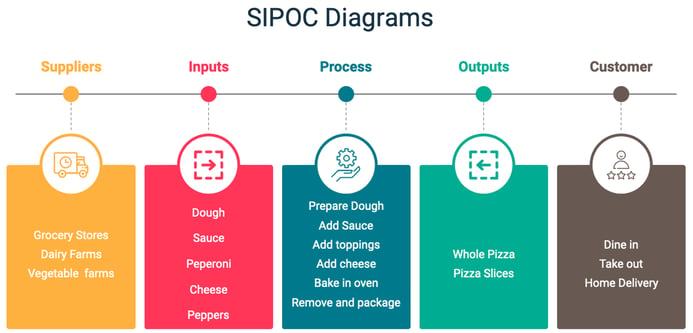
When I’m looking for opportunities to improve a process, I use process diagrams to identify bottlenecks, unnecessary handoffs, duplicate work, and opportunities to simplify the workflow. Alongside detailed workflow diagrams, I also use SIPOC diagrams to summarize suppliers, inputs, process activities, outputs, and customers. Looking at both the detailed workflow and the bigger picture helps ensure improvements are made in the context of the overall business rather than in isolation.
Looking back over the projects I’ve been involved in, one lesson has remained remarkably consistent. Every successful improvement initiative started with understanding the process. The process diagram wasn’t the end goal, but it was almost always the starting point.
Creating Effective Process Diagrams
Creating an effective process diagram is about far more than drawing boxes and arrows. Over the years, I’ve found that the quality of a process diagram has very little to do with the software you use and everything to do with how well you understand the process you’re trying to document. A good process diagram should help people understand how work gets done, create a common understanding across the organization, and provide a solid foundation for improvement.
The first step is defining the process itself. Before documenting activities, it’s important to understand the purpose of the process, where it starts, where it ends, and who is involved. Defining those boundaries early prevents the process from becoming either too broad or too detailed and ensures everyone is working toward the same objective.
Once the scope is clear, I gather information from the people who actually perform the work. That may involve interviewing subject matter experts, reviewing existing documentation, facilitating workshops, or simply observing the process in action. My objective is always the same: understand how the process really works, not how people think it works. There’s often a significant difference between the documented process and the one that’s executed every day, and it’s that reality that should be reflected in the diagram.
The next step is deciding on the appropriate level of detail. Not every audience needs the same information. An executive may only need a high-level overview, while a process owner, business analyst, or implementation team may require a much more detailed workflow showing activities, decision points, business rules, exceptions, and handoffs. The diagram should always be designed for the people who will use it.
Only then do I start thinking about tools and notation. There are many excellent diagramming tools available, from Microsoft Visio to enterprise platforms like the Navvia Process Designer, but the software isn’t the most important decision. The same is true for notation. Whether you use a simple flowchart or a more sophisticated standard such as BPMN, consistency is far more important than complexity. The objective is to create a diagram that people can understand, use, and maintain.
As I build the workflow, I capture the activities, decision points, handoffs, and key business rules in the order they occur. I also like to establish where the process fits within the organization before documenting the detailed workflow. Understanding the broader context helps people see not only how the process operates, but why it exists and how it contributes to the business.
Once I have a draft, I review it with the people who perform the work. In my experience, validation is one of the most valuable parts of the exercise. It confirms the process accurately reflects reality while almost always uncovering opportunities for improvement. Simply seeing the entire workflow laid out visually often sparks discussions about unnecessary approvals, duplicate activities, unclear ownership, or ways to simplify the process.
It’s also important to remember that a process diagram is only one part of good process documentation. Depending on the purpose of the process, I also document information such as:
- Process objectives and scope
- Roles and responsibilities
- Inputs and outputs
- Controls and measurements
- Supporting systems and tools
- Policies, procedures, and work instructions
Together, these provide the information people need not only to understand the process, but to execute and govern it consistently.
Finally, treat your process diagrams as living assets. Organizations change. Technology evolves. Regulations are updated. Customer expectations shift. As the business changes, the documentation should change with it. A process diagram should reflect how the organization operates today—not how it operated several years ago.
Just as importantly, don’t confuse creating a process diagram with completing the job. A process diagram creates understanding, but understanding alone doesn’t improve performance. The real value comes from what happens next: assigning ownership, establishing governance, measuring results, and continually improving the process. That’s the difference between documenting a process and truly managing one.
Choosing the Right Process Diagram
One of the questions I’m asked most often is, “Which type of process diagram should I use?”
The answer is simple: it depends.
There isn’t a single process diagram that’s right for every situation. Different diagrams communicate different information, and over the years I’ve found that the best choice depends on what you’re trying to accomplish and who you’re trying to communicate with. The objective isn’t to create the most sophisticated diagram possible. It’s to create one that people understand and use.
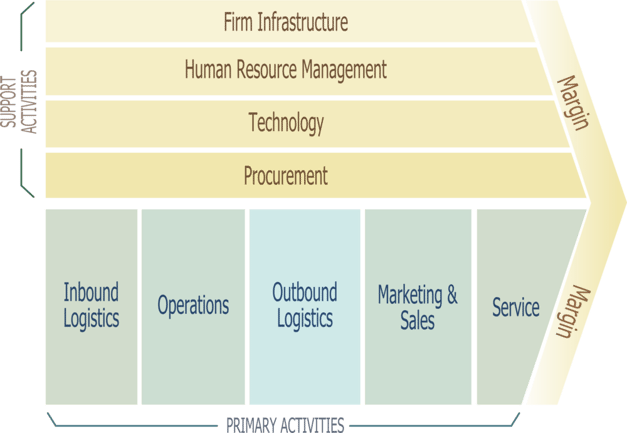
I often begin with a Value Chain Diagram. Before documenting individual processes, I like to understand how the organization delivers value to its customers. A value chain provides that big-picture view by identifying the major business activities involved in delivering a product or service. Once that picture is clear, it becomes much easier to identify the individual processes that deserve more detailed analysis.
When I want to define the scope of a process, I’ll often use a SIPOC diagram. By identifying the Suppliers, Inputs, Process, Outputs, and Customers, everyone quickly develops a common understanding of what the process includes and, just as importantly, what it doesn’t. I’ve found it to be one of the simplest ways to align stakeholders before investing time documenting a detailed workflow.
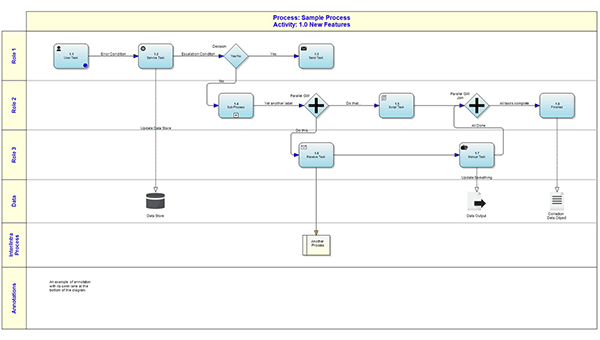
Once it’s time to document the workflow itself, I usually choose between a traditional flowchart and a swim lane diagram.
Flowcharts have been around for more than a century, and for good reason. They’re easy to understand and do an excellent job of illustrating the sequence of activities and decision points within a process. If the objective is simply to communicate how work flows from beginning to end, a flowchart is often all that’s needed.
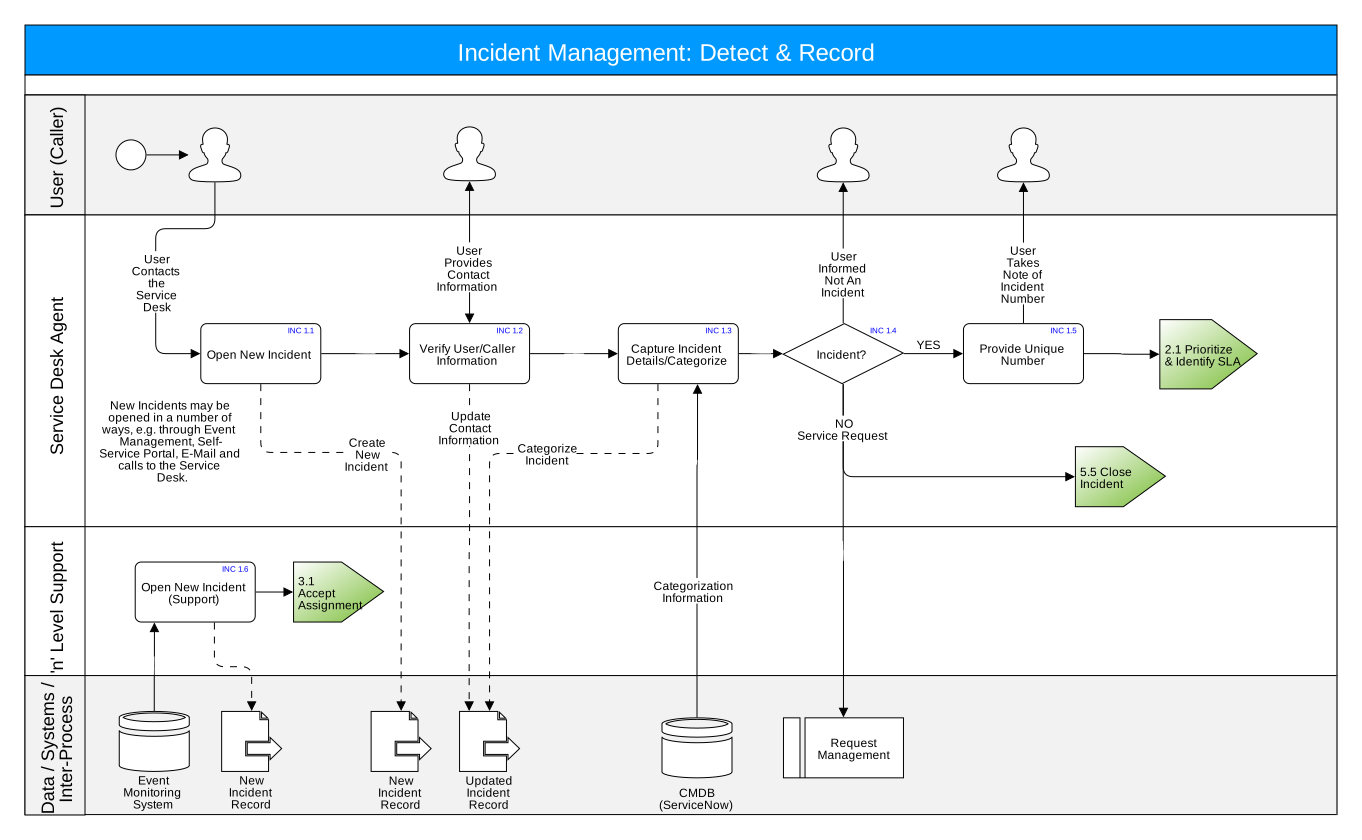
When responsibilities become important—and they usually do—I prefer a swim lane diagram. By organizing activities into lanes based on departments, roles, or individuals, swim lane diagrams clearly show who performs each activity and where work moves between teams. Those handoffs often reveal delays, duplicate effort, unnecessary approvals, and unclear ownership that might otherwise go unnoticed.
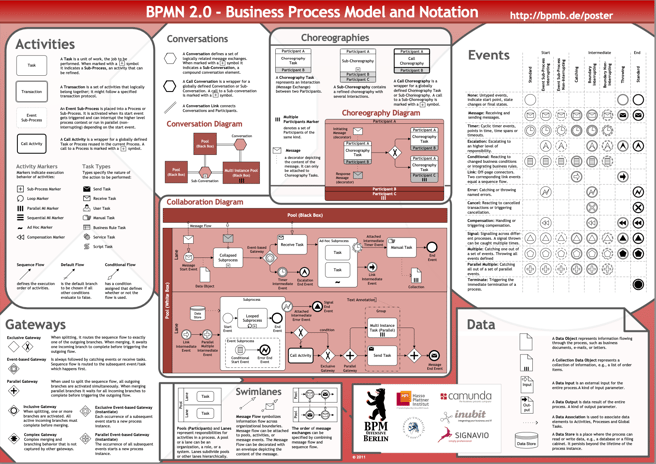
For more complex business environments, Business Process Model and Notation (BPMN) provides a standardized way to document sophisticated workflows involving systems, events, gateways, parallel activities, and integrations. BPMN is an excellent notation when that level of precision is required, but it also introduces additional complexity. Unless there’s a specific need for BPMN, I generally prefer diagrams that business users can understand without specialized training
Depending on the project, I may also use LOVEM (Line of Visibility Enterprise Modeling) diagrams. Similar to swim lane diagrams, LOVEM emphasizes the customer’s perspective by distinguishing between activities that are visible to the customer and those performed behind the scenes. They can be particularly useful when designing or improving customer-facing services because they highlight every customer touchpoint throughout the process.
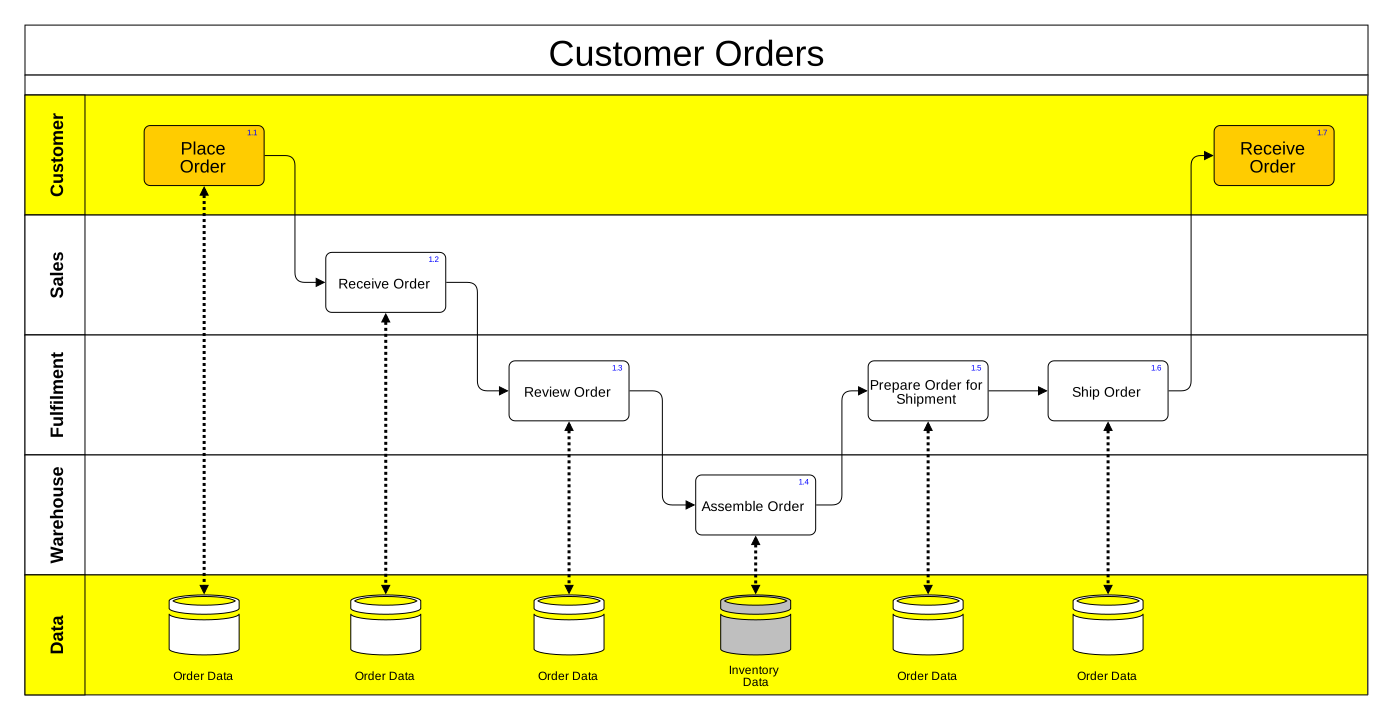
One lesson I’ve learned over the years is that the notation itself is rarely the most important decision. I’ve seen beautifully constructed BPMN diagrams that nobody used because they were too complicated, and I’ve seen simple flowcharts transform the way an organization worked because everyone understood them.
My advice is simple: choose the simplest diagram that effectively communicates what your audience needs to understand. The purpose of a process diagram isn’t to demonstrate expertise in process modeling. It’s to help people understand how work gets done. If the people using the diagram don’t understand it, you’ve chosen the wrong one.
The Biggest Mistake Organizations Make
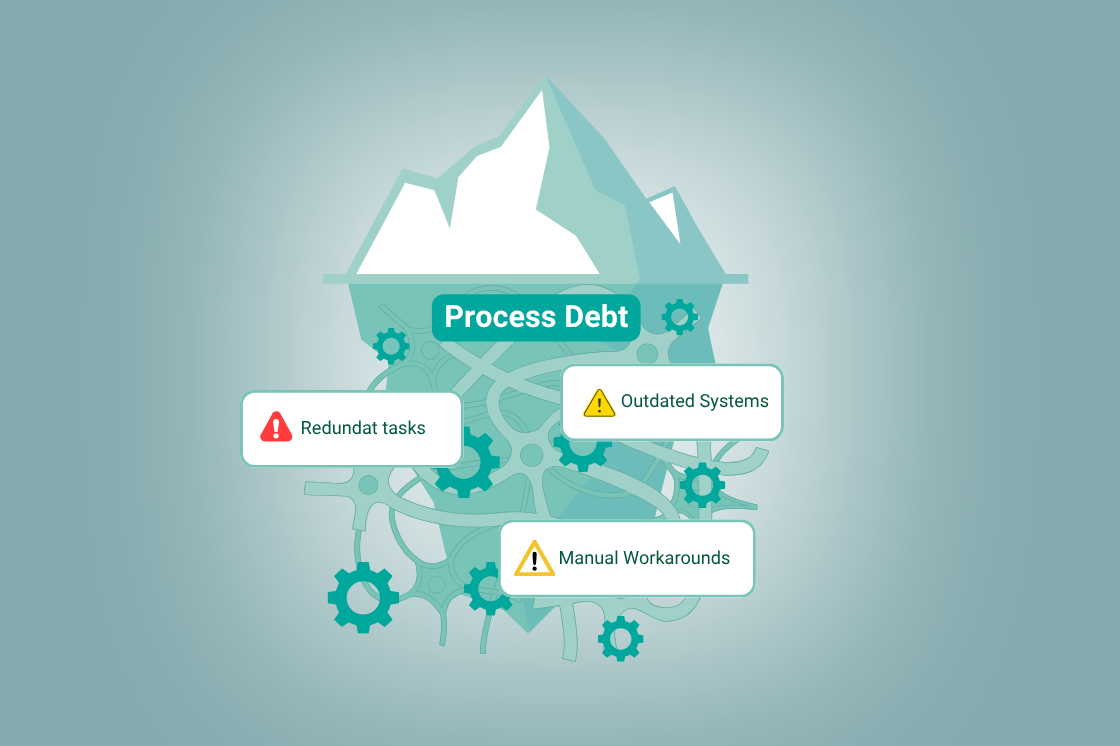
Over the years, I’ve seen organizations invest enormous amounts of time documenting their processes. They interview stakeholders, facilitate workshops, review diagrams, obtain approvals, publish the documentation, and then move on to the next project. A year later, the documentation is out of date, people have developed workarounds, new systems have been introduced, and very few people ever look at the process diagrams again.
The problem isn’t the process diagram. The problem is believing that documenting a process is the same as managing it.
Throughout this article, I’ve made the point that a process diagram is only one piece of the puzzle. It provides a visual representation of how work should flow, but it doesn’t tell the whole story. What are the goals and objectives of the process? Who owns it? What are the roles and responsibilities? How is it governed? How is performance measured? What policies, procedures, work instructions, and supporting systems enable people to execute it consistently?
Those questions don’t diminish the importance of process diagrams—they reinforce it. A process diagram provides the context for everything else. It’s difficult to govern, measure, improve, or automate a process if people don’t first share a common understanding of how the work should flow.
Over the years, I’ve come to believe that the real objective isn’t simply to document a process. It’s to operationalize it.
When I talk about operationalizing a process, I mean embedding it into the day-to-day operation of the business so it consistently delivers the outcomes it was designed to achieve. In my experience, mature processes have several characteristics in common:
- A clearly defined owner who is accountable for the process.
- Documented roles and responsibilities.
- Consistent execution across the organization.
- Appropriate oversight and governance.
- Meaningful measurements that demonstrate whether the process is achieving its objectives.
- Continual improvement driven by data, feedback, and changing business needs.
Without those elements, even the best process documentation eventually becomes shelfware. Businesses change, people develop their own ways of working, and documentation gradually loses relevance. The process wasn’t the problem. The management system around the process was.
I’ve always looked at a process diagram as the blueprint for understanding how work should be performed. Like the blueprint for a house, it provides an essential foundation, but the blueprint itself doesn’t build anything. In the same way, documenting a process doesn’t improve it. The value comes from executing it consistently, measuring its performance, governing it effectively, and continually improving it over time.
When organizations make that shift—from documenting processes to managing them—they begin to realize the full value of Business Process Management. Processes become more consistent, accountability becomes clearer, decisions become better informed, and continual improvement becomes part of the organization’s culture rather than another improvement initiative.
That’s why I often say documentation is not maturity. A process diagram is the starting point. Operationalizing the process is what turns that documentation into business value.
Why AI Raises the Stakes
For many years, process diagrams were primarily associated with process improvement, automation, and digital transformation. Today, AI has given organizations another compelling reason to understand their processes.
Organizations are embedding AI into customer service, software development, IT operations, cybersecurity, finance, human resources, and virtually every other business function. Used well, AI has the potential to improve productivity, reduce costs, and support better decision making. Used poorly, it can create financial, operational, regulatory, and reputational risks at the same speed and scale.
One of the questions I’m asked most often is, “How do we govern AI?” My answer usually surprises people because it doesn’t begin with policies, committees, or risk registers.
It begins with understanding your processes.
Over the past year, I’ve written extensively about AI governance, and one theme continues to emerge. AI governance doesn’t happen in policies, committees, or risk registers. Those are important, but governance ultimately happens through the operational processes people execute every day. If those processes aren’t well understood, consistently executed, and properly governed, introducing AI won’t solve the problem. It will simply automate it.
Before introducing AI into a process, organizations should understand where AI is being used, who owns it, what decisions it supports, what information it consumes, what information it produces, and what controls are needed to manage the associated risks. If your processes are well documented and operationalized, many of those answers already exist.
Unfortunately, I think many organizations have the order backwards. They’re so focused on implementing AI that they automate processes they don’t fully understand. In my experience, the most successful organizations follow a much simpler approach:
- Understand the process.
- Simplify the process.
- Operationalize the process.
- Then automate the process.
That sequence served organizations well long before AI arrived, and I believe it’s even more important today.
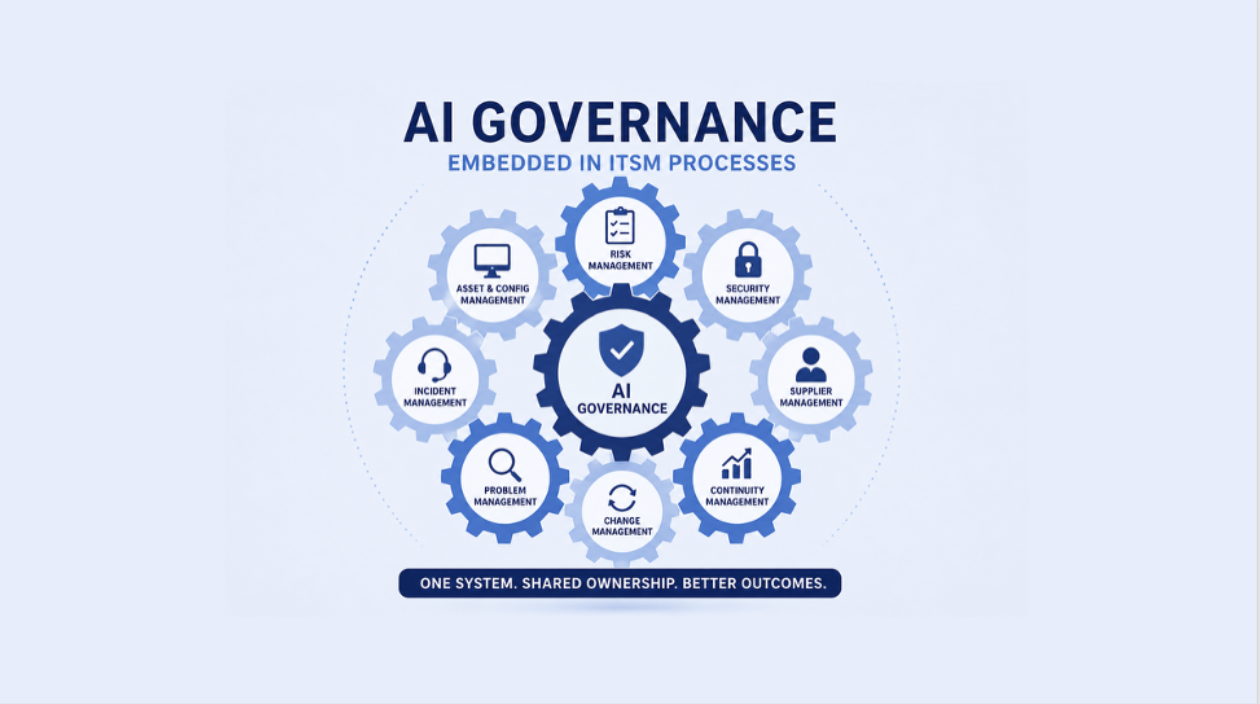
I’ve also come to believe that AI governance shouldn’t exist as a standalone discipline alongside IT Service Management or Business Process Management. It should be embedded within the operational processes that already govern how work gets done.
Consider a few examples. IT Asset Management and Configuration Management help organizations understand what AI systems exist and who owns them. Risk Management provides the framework for identifying and treating AI-related risks. Information Security Management helps protect AI systems and the information they process. Change Management ensures AI solutions are properly evaluated before they’re introduced into production, while Incident and Problem Management provide structured approaches for responding to AI-related failures and preventing them from recurring. Supplier Management becomes increasingly important as organizations rely on third-party AI platforms and products with embedded AI capabilities.
The same principle extends well beyond IT. Finance, Human Resources, Legal, Operations, Marketing, and Customer Service are all incorporating AI into the way they work. Those business processes require the same ownership, governance, oversight, measurement, and continual improvement we’ve discussed throughout this article.
That’s why I believe AI governance is fundamentally an operational challenge rather than a technology challenge. Policies are important, but governance ultimately happens through the processes people execute every day. If we don’t understand and operationalize those processes first, AI won’t improve them. It will simply amplify their weaknesses.
Final Thoughts
I’ve spent much of my career helping organizations understand, improve, and govern their business processes. During that time, the tools have changed, technology has evolved, and now AI is transforming the way organizations work. What hasn’t changed is the importance of understanding how work gets done.
Process diagrams remain one of the simplest and most effective ways to build that understanding. They improve communication, create a common language for collaboration, simplify onboarding, identify opportunities for improvement, and provide the foundation for automation. More importantly, they help people understand a process before they attempt to improve it, automate it, or govern it.
That’s where I believe many organizations lose their way. They invest in documenting processes but stop short of operationalizing them. A process diagram, no matter how well designed, doesn’t improve performance on its own. The real value comes from what happens next: assigning ownership, establishing governance, measuring performance, and continually improving the process as the business evolves. Documentation is the starting point. Operationalizing the process is what turns that documentation into business value.
Whether your objective is improving customer service, implementing IT Service Management, increasing operational resilience, or adopting AI, I believe the same principles still apply:
- Understand the process.
- Simplify the process.
- Operationalize the process.
- Then automate the process.
AI will undoubtedly transform the way organizations operate over the coming years, but I don’t believe the organizations that benefit the most will necessarily be those with the most AI. They’ll be the organizations that best understand the processes AI is supporting.
If you don’t understand your processes, AI won’t either.
Whether you’re improving operations, implementing ITSM, or preparing for AI, understanding your processes is still the best place to start.